
Introduction
OneDrive is a modern cloud storage service developed by Microsoft. It allows users to store their files online and access them anytime from anywhere. In today’s digital age, managing data safely is very important, and OneDrive provides a simple and secure way to do that.
What is OneDrive?
OneDrive is an online storage platform where users can save documents, photos, videos, and other files. Instead of keeping files only on your device, OneDrive stores them on cloud servers. This makes it easy to access your data from different devices like computers, tablets, and smartphones.
It works like a virtual hard drive that is connected to the internet.
How OneDrive Works
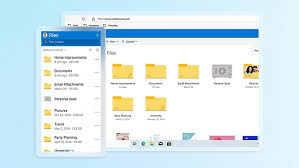
OneDrive works by uploading your files to the cloud. Once uploaded, your files are stored safely on Microsoft’s servers. Whenever you log in to your account, you can access your files instantly.
If you make any changes to a file, OneDrive automatically updates it. This feature is called syncing, and it ensures that you always have the latest version of your files.
Features of OneDrive
OneDrive offers many useful features that make it a popular choice for users. It provides secure cloud storage, making sure your files are safe. It also allows easy file sharing through links, so you can send files to others quickly.
Another important feature is automatic backup. Your files are saved in the cloud, so even if your device is lost or damaged, your data remains safe. OneDrive also works smoothly with tools like Microsoft Word, Microsoft Excel, and Microsoft PowerPoint, which makes it very useful for office work.
Benefits of OneDrive
OneDrive makes life easier by allowing you to access your files from anywhere. You do not need to carry USB drives or send files through email. Everything is stored in one place.
It also improves teamwork. Multiple users can work on the same file at the same time without confusion. This is very helpful for businesses and teams.
Another benefit is security. OneDrive uses strong protection systems to keep your data safe from unauthorized access.
Storage Plans
OneDrive offers both free and paid storage options. The free plan provides limited space, which is enough for basic use. If you need more storage, you can upgrade through Microsoft 365 plans, which offer larger space and additional features.
OneDrive vs Other Cloud Storage
Compared to other cloud storage services, OneDrive stands out because of its deep integration with Microsoft tools. While some platforms may offer more free space, OneDrive provides better productivity features, especially for professionals and students.
Is OneDrive Safe?
Yes, OneDrive is a very secure platform. It uses encryption technology to protect your data. It also offers additional security features like two-factor authentication, which adds an extra layer of protection to your account.
Conclusion
OneDrive is a powerful and easy-to-use cloud storage service. It offers secure storage, easy access, and smooth integration with Microsoft tools. Whether you are a student, freelancer, or business user, OneDrive is a reliable solution for managing your files online.