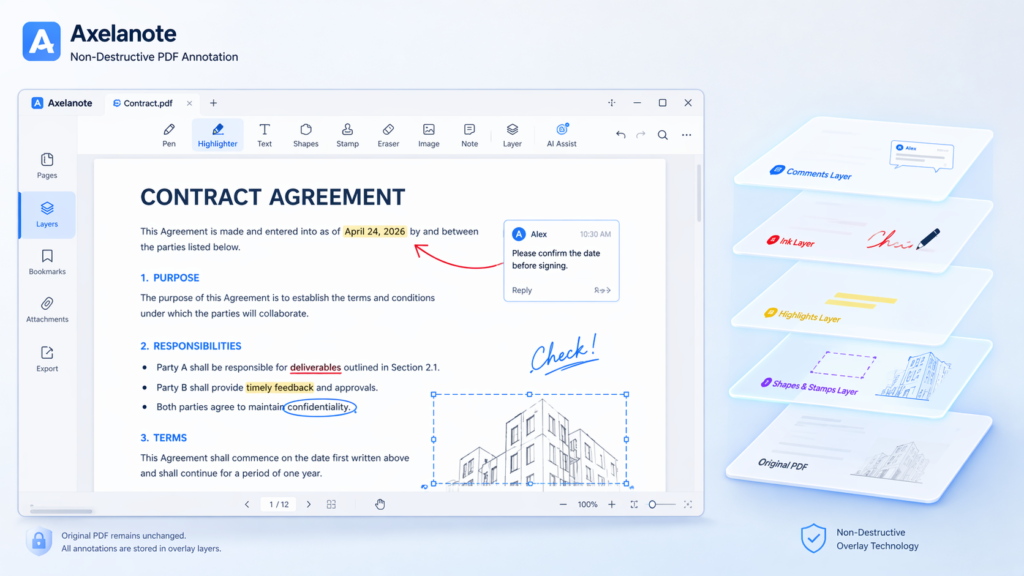
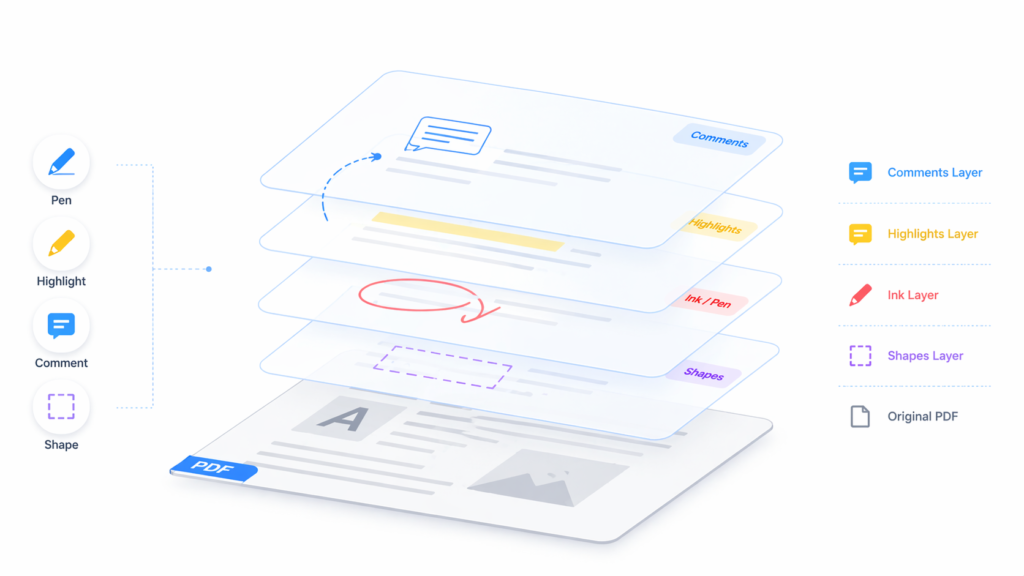
Axelanote is a Windows-based PDF annotation software developed by TransRecog. It uses a patented non-destructive “overlay” technology, allowing users to add highlights, comments, and markup to PDFs, images, videos, and other documents without altering the original file.
Key Features
It supports layered annotations, real-time collaboration, tablet pen handwriting, and an infinite canvas for note-taking. The tool preserves document integrity, making it ideal for proofreading contracts, research papers, or textbooks.
Use Cases
Common in printing, architecture, and legal fields for secure, efficient markup. Recent updates emphasize AI-assisted notes and productivity boosts.
Availability
Download from TransRecog’s site with a free trial; Japanese sites like Tekwind offer support and sales.
To download and install Axelanote (also known as AxelaNote), visit the official developer site at TransRecog.
Download Steps
Download the installer “Setup.msi” from the TransRecog AxelaNote product page (https://www.transrecog.com/axelanote/). A free trial is available with basic features; full mode requires a license purchase.
Installation Steps
Double-click Setup.msi, click “Next,” accept the license, choose install location, then proceed through prompts including User Account Control if prompted. The process completes quickly; restart if needed for settings.
Post-Install
Launch from Start menu, drag a PDF or image onto the app for first use, and activate license via Settings > License with your key and email for full features like unlimited pages and objects.
Axelanote excels in non-destructive PDF annotations via overlay layers, while Adobe Acrobat offers comprehensive PDF editing but modifies originals.
Feature Comparison
| Feature | Axelanote | Adobe Acrobat |
|---|
| Feature | Axelanote | Adobe Acrobat |
|---|---|---|
| Non-destructive layers | Yes | No |
| Restricted PDFs | Yes (full annotation) | Limited |
| Stylus optimization | Yes (pressure-sensitive) | Partial |
| CSV data export | Yes | No |
| Platforms | Windows only | Cross-platform |
| Collaboration | Layer sharing (async) | Real-time + sharing |
Pricing and Use Cases
Axelanote offers a free trial with paid licenses for full features, suiting PDF review workflows like legal or research. Adobe Acrobat’s subscription starts higher but fits broader editing needs.
Strengths and Limits
Choose Axelanote for secure, layered markup on locked files; opt for Acrobat for creation, conversion, and multi-device use.
Axelanote offers non-destructive PDF annotations through overlay layers, stylus support, and multi-layer management. It excels in secure markup for professionals without altering originals.
Key Features
- Handwriting, highlights, stamps, and shapes with pressure-sensitive stylus input.
- Multi-layer system for separate notes (e.g., personal vs. team), hidable or shareable.madememine+1
- Automatic numbering for reviews, page editing (insert/delete/rearrange), and CSV exports.madememine+1
- Infinite canvas, real-time collaboration, and AI-assisted search in some updates.
Basic Tutorial
Open Axelanote, drag a PDF/image onto it. Select pen/highlighter tools from toolbar, draw or write—annotations stay on layers. Toggle layers via panel, add text/stamps, then export as new PDF or share layers.
Advanced Steps
Customize toolbar, use auto-numbering for lists (e.g., ①②③), calibrate stylus in settings. For collaboration, save/share layer files; import pages for workflows like legal reviews.
Axelanote uses a subscription model with user or device licenses, plus a 30-day full-feature free trial. Basic features remain free post-trial.
Pricing Plans
User license (per person, up to 3 PCs): ¥4,680/year (tax excl., incl. support).
Device license (per PC): ¥6,480/year (tax excl., incl. support).
Monthly Options
Some resellers offer monthly plans around ¥390–429/month or annual ¥3,900–4,290.
Current Promotions
No active promotions as of April 2026; past deals like 50% off for first 100 buyers expired years ago. Check TransRecog or Tekwind sites for updates, or use the free trial.
Top alternatives to Axelanote emphasize non-destructive annotations, stylus support, and PDF markup for Windows users.
Feature Comparison
| Tool | Key Strengths | Platforms | Pricing |
|---|---|---|---|
| PDF-XChange Editor | Lightweight layers, freehand drawing, cloud sync | Windows/Mac | Free/Paid (~$56 one-time) |
| Foxit PDF Reader | Highlights, stamps, security focus ruttl+1 | Cross-platform | Free/Paid (~$10/month) |
| Xodo PDF | Fast annotations, OCR, mobile sync ruttl+1 | All platforms | Free/Paid plans |
| PDFelement | AI tools, shapes, collaboration zipboard+1 | Cross-platform | ~$80/year |
| Drawboard PDF | Pen-like markups, real-time collab | Windows/iPad | ~$5/month |
Recommendations
For Axelanote’s overlay layers on locked PDFs, try PDF-XChange Editor first—it’s free and Windows-optimized. Foxit suits broader editing needs like Acrobat alternatives.